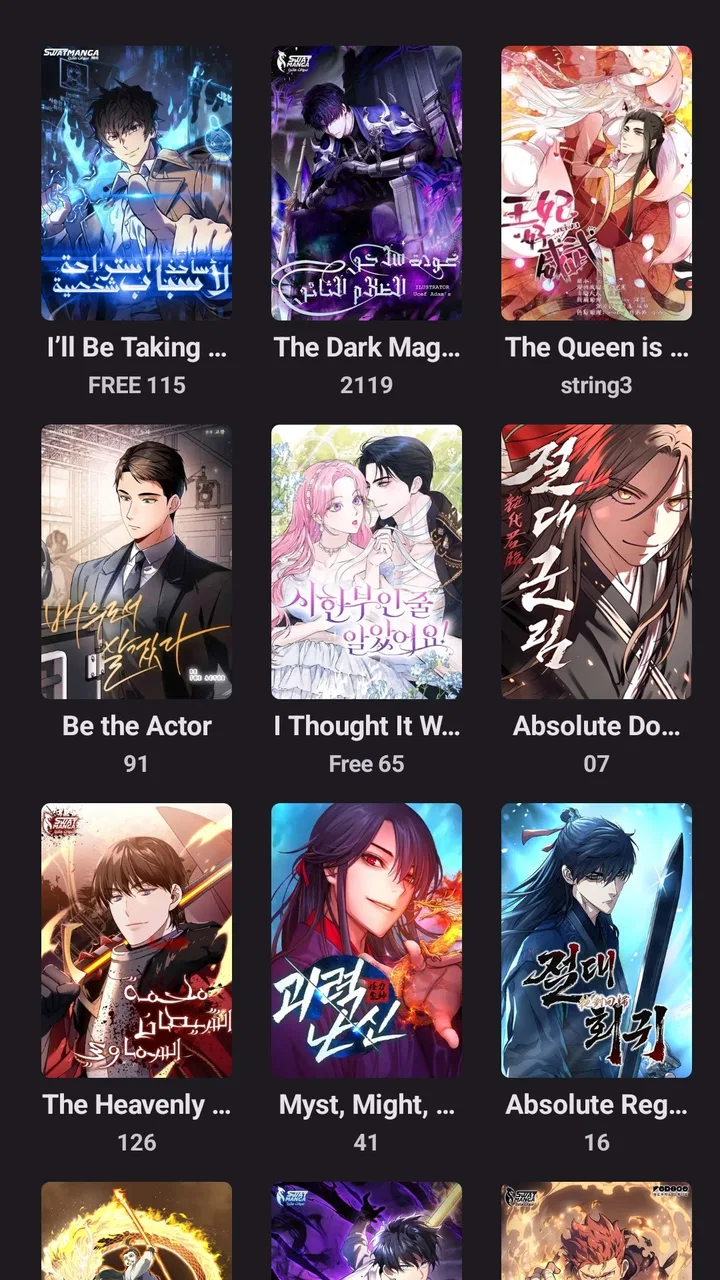
مانجا سوات - Swat Manga
- 3.9
- Rating
- 100.00K
- Installs
- Free
- Price

 Analysis by App-foxy
I approached مانجا سوات - Swat Manga as someone looking for a straightforward way to read manga from the Swat Manga service rather than as a general-purpose comic reader. Its store summary describes it as the dedicated application for the Manga SWAT website, and that focus is important: the app feels like a mobile doorway into one reading ecosystem, not a broad library that tries to combine every publisher or source in one place.
That narrow purpose can be a real advantage. If the titles you want are already part of the Swat Manga catalog, opening a dedicated app is more comfortable than repeatedly switching to a mobile browser. If you expect a universal comic platform, however, you may find the experience less suitable. My overall impression is that this is best judged by the quality and convenience of its connection to that particular service, not by comparing it with enormous multi-source comic platforms.
From wanting to read to finishing a chapter
I find the most useful way to judge this app is to follow one reading session from the first tap to the moment I put my phone away: does it get me to a chapter without unnecessary detours, and can I pick up the habit again later? I’ll also consider what changes when a quick browse turns into a longer session, since that is where comfort and consistency matter most.
You May Also Like

 Blood Strike: 2.5 Anniversary
Blood Strike’s Loadouts Turn Every Drop Into a Tactical Gamble
A close look at Blood Strike’s custom loadouts: how fast access to signature weapons reshapes its battle royale rhythm, rewards preparation, and narrows the gap between fights.

 Pandora - Music & Podcasts
Pandora’s Music Is Easy to Start, but Harder to Recover
Pandora’s strength is its low-effort path from a seed to a station. Its weak spot is how much confidence it asks you to place in connection, setup, and quiet recovery.

 8 Ball Pool
 Is Built on Rivalries, Rematches, and Routine
A close look at the rivalries, rematches, shared routines, and unanswered safety questions that turn a quick pool match into a persistent mobile community.

 Samsung Music
’s Quiet Strength Is Playing What You Already Own
Its reach comes less from spectacle than from dependable access to a personal library. That simplicity is both the app’s strongest retention engine and its ceiling.

 AccuWeather: Weather Radar
AccuWeather Review: A Quick, Clear Forecast for Everyday Decisions
For everyday plans, the best forecast is the one you can understand quickly. AccuWeather makes rain timing, radar, and local conditions easy to act on, with a few trade-offs.

 Hill Climb Racing
Why Hill Climb Racing Still Turns Crashes Into One More Run
A tiny car, a bumpy hill and one more upgrade: Hill Climb Racing keeps resurfacing because its simple chaos makes every near-miss feel personal.
More From Our News Desk



The starting point: choosing a focused manga app
The app sits in the Comics category and is developed by Swatmanga. It is free, carries an Everyone age rating, and supports devices running Android 6.0 or later. Those details make it approachable for a wide range of readers, including people using older Android hardware. I would still think about the device itself before installing: a compatible operating system only tells you that the app can run, not that every older phone will offer the same comfort when displaying full comic pages.
Its audience is fairly easy to identify. I would recommend it to a reader who already knows the Manga SWAT website, prefers reading in Arabic or follows manga presented through that service, and wants a more direct mobile starting point. Someone who mainly reads from several unrelated publishers may be happier with a service designed around a wider catalog. The free price removes the usual financial barrier to trying it, so the more meaningful question is whether its source matches your reading habits.
The short store description is simply “مانجا سوات,” which says very little about the day-to-day experience. That makes the first session especially important. Rather than assuming the app will behave like a full-featured reading shelf, I would begin by checking how quickly it gets me from opening the app to the series or chapter I actually want. A focused app earns its place by reducing that distance.
Step one: finding the right series without creating extra work
My preferred workflow starts with a specific goal: I want to continue a series, discover something related, or read a chapter during a short break. In that situation, the useful test is not how impressive the opening screen looks. It is whether the catalog and navigation help me make a decision quickly. I look for recognizable series names, clear chapter ordering, and enough context to avoid opening several wrong entries.
With a website companion such as this, the handoff between browsing and reading matters more than decorative design. If I arrive from a search result or a recommendation, I want the app to feel like the next step rather than a separate product that makes me start over. A good routine is to search with the exact series title when possible, then confirm the chapter number before reading. That small check prevents a common manga-reading annoyance: entering a later chapter by mistake and spoiling a major scene.
For discovery, I would take a slower approach. Browse a few entries, note how titles are grouped, and learn the visual cues used for new or continuing chapters. I would not assume that the first prominent item is automatically the best recommendation for me. A dedicated catalog can be efficient for regular users, but the quality of discovery depends on how well its organization matches what I already know about the series.
Step two: moving from a listing into the reading session
Once I choose a title, the next handoff is from information to action: selecting a chapter and beginning the pages. This is where a mobile reader should reduce interruptions. I prefer to decide the chapter before settling into a comfortable grip, especially when reading on a phone with one hand. If the app makes me repeatedly return to a list to change chapters, that becomes noticeable during a long session.
A practical habit is to pause at the beginning of a chapter and confirm that the page direction feels natural. Manga readers often have strong preferences about whether pages should be advanced with taps, swipes, or a chosen reading direction. I would spend a minute testing that instead of discovering halfway through a dramatic scene that my thumb gesture behaves differently from what I expected. This is a small workflow improvement, but it saves frustration every time the app is used.
I also recommend treating the first chapter as a compatibility check for your phone. Look at text size, image clarity, scrolling comfort, and whether the screen stays readable at your normal brightness. These are personal factors that a rating cannot capture. A reader with excellent eyesight and a large display may find the layout comfortable, while someone using a compact phone may need more frequent zooming or repositioning.
Step three: managing the handoff between chapters
Finishing one chapter creates the most important repeat action in the app: deciding what comes next. In my experience with focused reading services, the smoothest workflow keeps the next chapter close at hand without making the reader lose their place. If I need to leave the reader, locate the series again, and reconstruct my position every time, the app starts feeling like a wrapper around a website rather than a reading tool.
My advice is to establish a simple personal routine. Before closing a session, remember the series and chapter you reached, especially if you are reading several titles at once. If the app presents the next chapter clearly, use that route; if not, return deliberately to the series page instead of relying on a random back-button sequence. This sounds basic, but it protects against the most common interruption: opening the app later and not knowing where the unfinished story was left.
This is also where the distinction between a dedicated app and a browser becomes clearer. A browser is flexible: I can keep several sites open, share pages, and use familiar navigation. The dedicated app is more appealing when I want a single-purpose reading entry point and fewer unrelated tabs competing for attention. The trade-off is that the app’s usefulness is tied closely to the Swat Manga service, while a browser can move more freely between sources.
What happens when the app hands me back to the service
The app’s relationship with the Manga SWAT website shapes the entire experience. I see it less as an independent comic universe and more as a mobile handoff into an existing destination. That can be convenient for established readers: the service is familiar, the purpose is clear, and there is less temptation to treat the app as a social network, game, or general entertainment hub.
At the same time, this arrangement means I would not install it expecting the same breadth of tools found in a large reading platform. A broad alternative may be better if I need cross-publisher subscriptions, extensive account management, or a single shelf combining unrelated services. Swat Manga makes more sense when the starting point and the destination are already the same place.
For a family member or friend, I would explain it this way: install it when you want access to Manga SWAT through a dedicated Android app; skip it if your main goal is to compare many comic ecosystems from one screen. The Everyone rating makes it broadly accessible as an app classification, but that does not mean every manga theme will suit every reader. I would still choose titles according to personal age and content preferences.
Turning a short break into a reliable reading routine
A realistic everyday scenario is a fifteen-minute wait before an appointment. I would open the app, continue a known series, read a manageable section, and stop at a clear chapter boundary rather than beginning a long session with no time to finish. The focused nature of the app works well here because I am not trying to organize a large digital library; I am trying to reach one reading destination quickly.
Another useful scenario is reading on an older spare phone. Since the minimum operating system is Android 6.0, the app is not restricted to only recent Android releases. I would nevertheless keep expectations practical: older hardware may make page loading, gestures, or screen transitions feel less immediate than on a newer device. If the phone is used mainly for reading, reducing background activity and keeping the display clean can make the session more pleasant without changing the app itself.
For readers who switch between devices, I would be more cautious. A website-based service can be convenient because it is not limited to one app installation, but the exact continuity of a reading position depends on how the service handles that transition. My workflow would therefore include noting the current chapter before switching devices. It is a tiny manual step, but it avoids losing time when the next session begins somewhere else.
The result: where it succeeds
The strongest result is simplicity of purpose. I do not have to treat this as a crowded entertainment application with unrelated sections. It is a Comics app connected to Swat Manga, and that directness is valuable when the reader already knows what they want to read. The fact that it is free also makes experimentation easy: I can try the app, compare it with my browser routine, and keep whichever path feels faster.
Its public response is encouraging without being a reason to ignore personal fit. The app has a 4.5 average from around seven hundred ratings, with dozens of written reviews, and it has passed the one-hundred-thousand-install mark. Those figures suggest that it has found a meaningful audience, but they do not guarantee that its navigation, page presentation, or catalog will suit every reader. I would treat the rating as a useful signal of general satisfaction, not as a substitute for testing the actual reading flow.
The current version is 1.3.7, so I would check that the installed copy is current before judging a problem as permanent. This is especially sensible for a service-linked application, where changes to the website and changes to the mobile wrapper can affect how the handoff feels. If a page behaves unexpectedly, I would first reopen the app and try the same route again before abandoning it; temporary loading friction and a consistent design limitation are not the same thing.
Where the flow breaks
The main weakness is the app’s dependence on a single ecosystem. If the Manga SWAT catalog does not contain the series I want, the polishedness of the app cannot solve that problem. A multi-source reader or a publisher-specific alternative may be the better choice for someone whose reading list is spread across many services. This is not a flaw for the intended audience, but it is a genuine limitation for a broad manga collector.
The second possible break is the browser-versus-app trade-off. A browser gives me familiar controls, easy sharing, and the ability to keep several reading sources available. The dedicated app gives me a cleaner, more focused entry point, but it also asks me to accept the boundaries of its own service. I would choose the app for concentration and convenience, and the browser for flexibility or comparison shopping between sources.
A third friction point is the personal nature of mobile page reading. Even when the content is available, a phone may not be the ideal screen for detailed artwork or small dialogue. I would not blame the app for every uncomfortable session: display size, orientation, brightness, and hand position all matter. Still, readers who require extensive customization should test the reader early and decide whether its controls match their habits.
I would also avoid assuming that free means frictionless in every situation. The absence of a purchase price is helpful, but reading comfort still depends on the service workflow, the device, and the user’s expectations. If I want a carefully organized personal library with every title from multiple providers, I would look elsewhere. If I want a direct mobile route into Manga SWAT, the free installation makes this a low-risk option.
Who should install it, and who should keep looking
I would install it if I already use Manga SWAT, read manga primarily on Android, and value a focused path from opening the app to selecting a chapter. It is also worth trying for readers who prefer not to keep a browser tab dedicated to one manga service. The Everyone rating and support for Android 6.0 or later make the entry requirements relatively welcoming.
I would keep looking if my priority is a universal catalog, advanced cross-service organization, or a reading environment independent of Swat Manga. In that case, the usual alternatives offer a better match because their core purpose is breadth rather than direct access to one website. I would also choose another option if the app’s page controls do not suit my preferred reading direction or if my phone makes full-page comics uncomfortable.
After using it, my recommendation is conditional but positive: choose it for a direct Manga SWAT reading workflow, not for a universal manga library. That distinction prevents disappointment and makes the app easier to evaluate fairly. Its value comes from shortening the route between a known service and a chapter, while its limits come from that same focused design.
For me, the final decision would take only one ordinary reading session. I would search for a familiar series, open the correct chapter, test the page movement, leave the app, and return later to see whether continuing feels natural. If that loop is comfortable, مانجا سوات - Swat Manga is a sensible free companion for regular Manga SWAT readers. If the loop feels like repeated browser navigation without enough convenience in return, I would simply use the browser or select a broader comic reader instead.
FAQs for مانجا سوات - Swat Manga
01What is مانجا سوات - Swat Manga and what can I do with it?
مانجا سوات - Swat Manga is a mobile application designed for manga enthusiasts. It provides access to a wide variety of manga series, allowing users to read their favorite stories on the go. The app offers both popular and niche titles, catering to diverse tastes. Users can explore different genres and bookmark their favorite manga for easy access.
02Is مانجا سوات - Swat Manga free to use, or are there any subscription fees?
The app is free to download and offers a selection of manga titles at no cost. However, there may be premium features or exclusive content that require a subscription or in-app purchases. Users should check the app's pricing model in the store description or within the app itself to understand any potential costs before downloading.
03Can I read manga offline with مانجا سوات - Swat Manga?
Yes, مانجا سوات - Swat Manga allows users to download chapters for offline reading. This feature is particularly useful for those who want to enjoy their favorite manga without a continuous internet connection. To download, simply select the desired chapters and store them on your device for later access.
04How frequently are new manga titles updated in the app?
Updates for new manga titles in مانجا سوات - Swat Manga typically follow the release schedules of the publishers. The app strives to provide timely updates, ensuring that users have access to the latest chapters as soon as they are available. Users can enable notifications to stay informed about new releases.
05Is مانجا سوات - Swat Manga available on both Android and iOS devices?
Yes, مانجا سوات - Swat Manga is available for download on both Android and iOS platforms. This ensures that users across different devices can enjoy their manga reading experience. Users should visit the Google Play Store or the Apple App Store to download the app and check for compatibility with their device.
Pros
- Extensive manga library with diverse genres.
- User-friendly interface for easy navigation.
- Offline reading mode available.
- Regular updates with new manga chapters.
- High-quality images and translations.
Cons
- Contains ads that might interrupt reading.
- Limited customization options for readers.
- Some manga titles are region-locked.
- Requires account for bookmarking.
- Occasional loading delays with large files.

مانجا سوات - Swat Manga
Gallery